

We’ve all experienced that creeping sense of dread. Your two-year-old iPhone, which used to blaze through apps and snap instant photos, suddenly stutters when you type. Apps take an extra beat to open. The smooth scrolling feels a bit jagged.
For years, conspiracy theories swirled around the internet: Is Apple intentionally slowing down my phone to force me to buy a new one?
While it felt like a corporate trap, the real answer is actually grounded in pure chemistry and electrical engineering. In this comprehensive guide, we will unpack the absolute truth behind iPhone slowdowns, look at how Apple’s battery ecosystem functions, and dive into the latest software fixes and features—including Adaptive Power—to restore your device to its former glory.
1. The Chemistry Lesson: Why Lithium-Ion Dislikes Aging
At the heart of your iPhone is a lithium-ion battery. These batteries are marvels of modern tech—they charge fast, last relatively long, and pack a massive amount of energy into a paper-thin profile. However, they are also consumable components with a strict lifespan.
As a battery chemically ages, two distinct changes occur:
- Capacity Drops: The battery simply cannot hold the same amount of total energy it did when it left the factory.
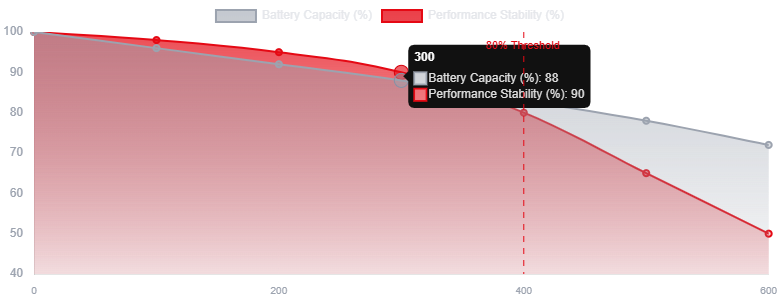
- Impedance Rises: This is the real culprit behind performance slowdowns. Impedance is essentially electrical resistance. A chemically older battery struggles to deliver power quickly when the phone’s main processor demands a massive “spike” of energy.
+-------------------------------------------------------+
| Older Battery -> High Impedance -> Weak Power Spikes   |
|                                                       |
| Result: Processor throttles down to prevent shutdown  |
+-------------------------------------------------------+
When you do something intensive—like launching a heavy mobile game, exporting a 4K video, or using the camera flash in cold weather—the CPU demands instantaneous peak power. If an aged battery cannot deliver that voltage quickly enough due to high impedance, the system voltage drops below a critical safety threshold. To protect its delicate internal circuits from frying, the iPhone triggers an unexpected shutdown.
2. The Apple “Throttling” Truth
To stop your phone from dying mid-task, Apple quietly introduced a dynamic performance management feature years ago. If your phone suffers an unexpected shutdown because the battery failed to deliver peak power, iOS automatically activates a protection system.
This system smooths out the power spikes. Instead of letting the processor run at 100% capacity and risk cutting the power, iOS cap or “throttles” the maximum speed of the CPU dynamically.
The Visible Symptoms of Performance Management:
- Longer app launch times.
- Lower frame rates while scrolling through social media feeds.
- Slower cellular data throughput or weaker signal processing.
- Gradual dimming of the backlight.
Apple isn’t slowing your phone down to empty your wallet; it’s slowing it down so it stays powered on when you need to make an emergency phone call or send a text message.
3. The 2026 Fixes: Restoring Your Speed
If your phone feels sluggish, don’t rush out to trade it in just yet. Modern updates have introduced deeply customizable features to manage this exact problem.
Step 1: Check Your Peak Performance Capability
Before tweaking anything, you need a diagnosis.
- Navigate to Settings > Battery > Battery Health (or Battery Health & Charging on older models).
- Look at your Maximum Capacity.
The 80% Rule: Apple considers an iPhone battery “healthy” if it retains at least 80% of its original capacity. If your percentage dips below 80% or says “Service”, performance management has likely been applied, and your processor is running at a lower gear.
+-------------------------------+
|  Battery Health Capacity      |
|  [||||||||||||||||||....] 80% | -> Below this? Performance drops!
+-------------------------------+
For an explicit visual breakdown of how system updates, network settings, and battery maintenance tie together in a full device ecosystem, refer to the step-by-step diagnostic layout shown in edited-image.jpg.
Step 2: Leverage “Adaptive Power” and AI Optimizations
Modern iOS builds feature highly sophisticated power tracking. Rather than relying on a blunt, rigid system slowdown, the system leverages machine learning via Adaptive Power.
- How it works: Adaptive Power tracks your daily habits, predicting exactly when you’ll need an extra boost of battery or when the phone can safely throttle down background apps without you noticing the slowdown.
- Action Item: Ensure this is enabled by going to Settings > Battery and checking your recommended performance profiles. Avoid leaving your phone permanently locked in traditional Low Power Mode, as this forces the system to aggressively curtail background functions and animations 24/7.
Step 3: Use the AI Diagnostics to Clean Background Sluggishness
Sometimes, a slowdown isn’t purely the battery’s fault—it’s poorly optimized software attacking a weakened battery.
- Open Settings > Battery and look directly above the Daily Usage chart.
- Look for Insights and Suggestions. The phone will explicitly flag resource-heavy apps running wild in the background. If an app shows high “Background Activity” while your battery health is low, restrict it or delete it.
Summary of Optimization Strategies
| Action | Path in Settings | Expected Outcome |
| Check Health Status | Battery > Battery Health | Determines if a physical replacement is required |
| Enable Adaptive Power | Battery > Power Profiles | Intelligently schedules peak power states |
| Toggle Background Refresh | General > Background App Refresh | Frees up CPU cycles for aged systems |
| Verify Battery Insights | Battery > Insights | Identifies high-drain application bugs |
For a clear visual map demonstrating how to execute complex system maintenance steps like software updates and force restarts sequentially, view edited-image_2.jpg.
4. The Ultimate Fix: The $99 Rejuvenation
If your iPhone’s maximum capacity has cratered into the low 70s or high 60s, no amount of software optimization, cache clearing, or setting adjustments will make it fast again. The physical physics of the battery cannot be bypassed.
The best economic fix is an official Apple Battery Replacement.
Instead of spending $800 to $1,200 on an entirely new smartphone, swapping a worn-out battery completely resets your phone’s power profiles. The moment the new battery is connected, impedance drops back to zero, the performance management system turns itself off, and the processor is instantly permitted to run at full speed again. It genuinely feels like a brand-new phone out of the box.
Tips to Protect a Fresh Battery:
- Avoid Extreme Thermal Loads: Do not leave your phone charging on a boiling car dashboard in direct sunlight. Heat destroys lithium-ion chemistry permanently.
- The 20-80% Trick: If possible, try not to let your phone consistently drop down to 0% or sit plugged in at 100% for days at a time. The chemical wear on a battery is highest at the absolute limits of its empty and full states.
By understanding the hardware reality of your phone and treating the battery as a naturally wearing part, you can maximize your phone’s lifespan and bypass unnecessary upgrade cycles entirely.